

Project information
Through data binding, the project exposes a contextual data tree. You can use it to personalize the experience, adapt layouts, detect launch conditions, or consume parameters passed to the project.
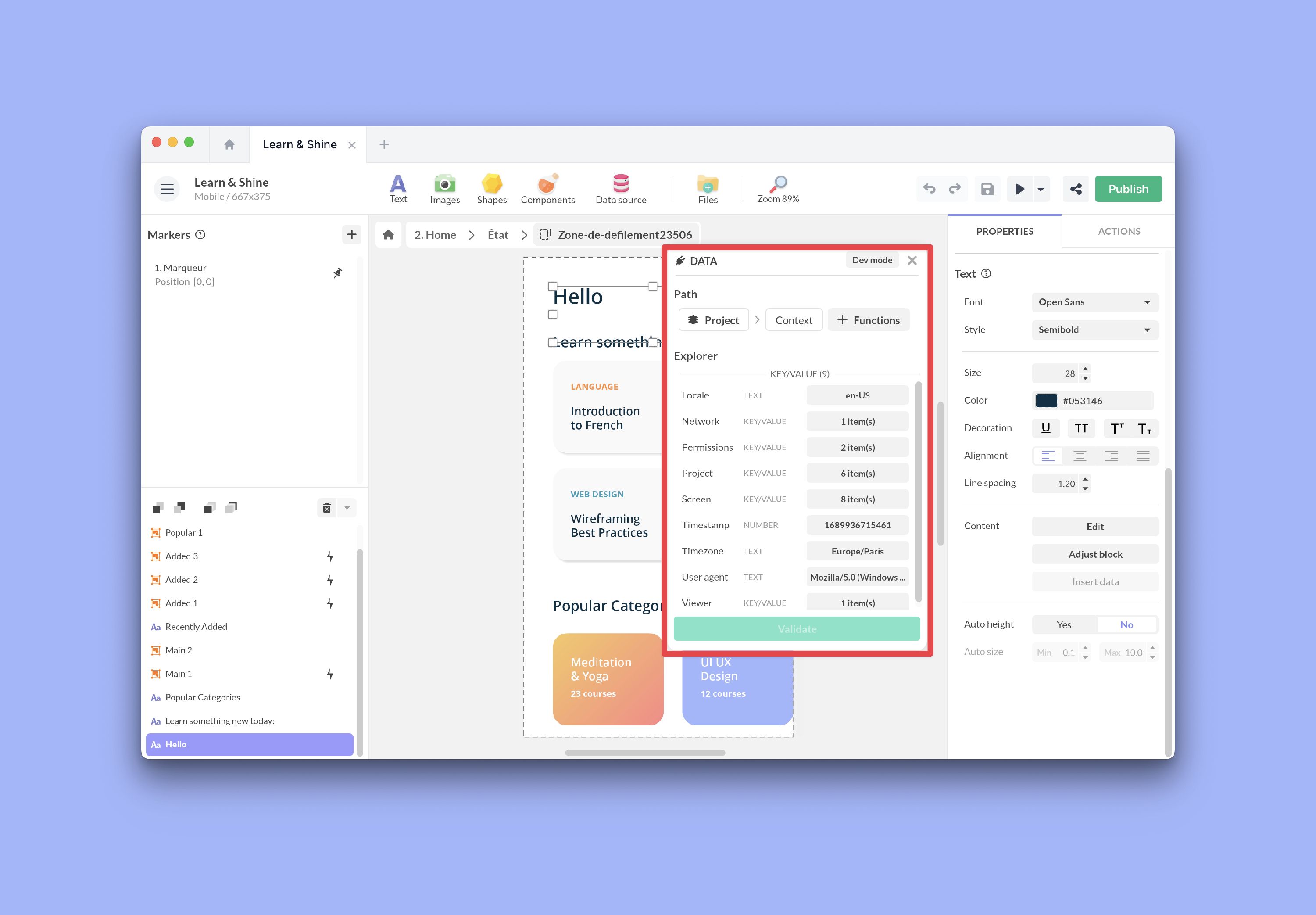
Project Information
The project exposes the following tree, grouped by category:
General context
Project > Context > localeProject > Context > userAgentProject > Context > timezoneProject > Context > timestamp
Screen and project
Project > Context > Screen > widthProject > Context > Screen > heightProject > Context > Screen > densityProject > Context > Screen > breakpointProject > Context > Project > widthProject > Context > Project > heightProject > Context > Project > portrait
Screens
Project > Screens > CurrentProject > Screens > Current > didProject > Screens > Current > nameProject > Screens > Current > indexProject > Screens > List > ... > screen
The Screen value keeps did as the screen identifier used for navigation.
name and index are exposed for display, sorting, or conditions. The index
starts at 0 and follows the order of the screens in the project.
Viewer and environment
Project > Context > Viewer > typeProject > Context > Viewer > uidProject > Context > Viewer > deviceTokenProject > Context > Viewer > Web > isPWAInstalledProject > Context > Network > wifiSSIDProject > Context > Permissions > tracking
Viewer > deviceToken contains the native push notification token exposed by
iOS and Android viewers. It can be empty when push notifications are not
configured, when the user has not granted notification permission, or before
the native platform has generated a token.
Launch
Project > Context > Launch > Parameter(s) > ...Project > Context > Launch > Url
Business parameters
Project > Push Notification (data) > titleProject > Push Notification (data) > messageProject > Push Notification (data) > soundProject > Push Notification (data) > Data > ...Project > EMM parameter(s) > ...Project > SSO parameter(s) > ...
Parameter(s) > ..., Push Notification (data) > Data > ..., EMM parameter(s) > ..., and SSO parameter(s) > ... are dynamic branches: the
available keys depend on what you declared in the project properties or what
the push payload contains.
Common examples
- Detect the device language with
Project > Context > locale - Adapt a layout with
Project > Context > Screen > breakpoint - Display the current screen name with
Project > Screens > Current > name - Check the current screen position with
Project > Screens > Current > index - Control a deep link with
Project > Context > Launch > Parameter(s) > wid - Send the current device token to your backend with
Project > Context > Viewer > deviceToken - Reuse a push campaign code with
Project > Push Notification (data) > Data > campaign - Check the iOS tracking status with
Project > Context > Permissions > tracking
Display a page indicator
The screen tree lets you build a running page indicator, such as 3 / 8, that updates on its own as the reader moves between screens. It combines two exposed values: the position of the current screen and the total number of screens.
Insert a text block where you want the indicator, open its Content data binding, and choose the Concat function to assemble three parts:
- Current page number —
Project > Screens > Current > index, with the Add function set to1. The index starts at0, so adding1makes the first screen read1. - A separator — a short text such as
/. - Total number of screens — the Count function applied to
Project > Screens > List.
Because the binding reads Current > index, the indicator refreshes automatically every time the active screen changes, including when the reader swipes in Magazine mode.